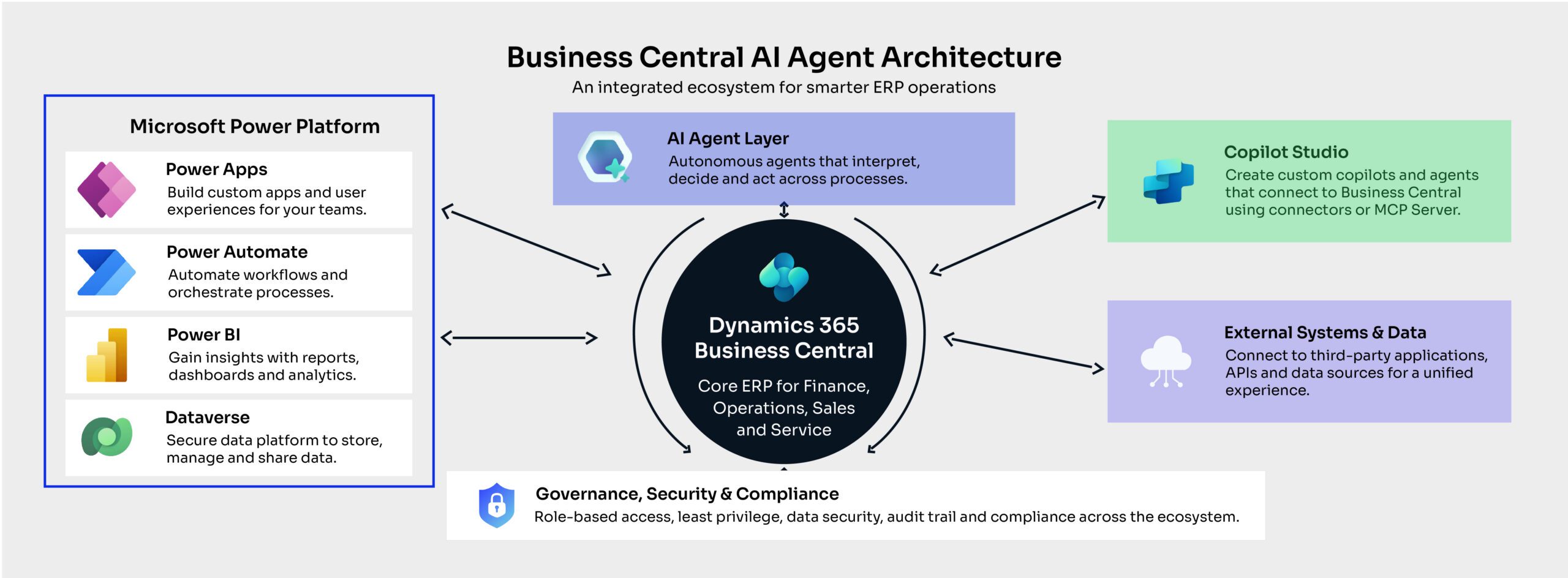
ERP automation has traditionally been predictable: a trigger occurs, a predefined rule runs, and an expected action follows. AI agents in Dynamics 365 Business Central change that model by introducing software workers that can interpret context, determine next steps and execute work with less continuous human direction.
This shift comes with good timing. Microsoft’s Work Trend Index found that 81% of leaders expected agents to be moderately or extensively integrated into their AI strategy within 12–18 months.
What are AI agents in Dynamics 365 Business Central?
AI agents are autonomous AI workers designed to complete defined business tasks with minimal human input while keeping their activity visible and reviewable.
That is an important distinction from Copilot. Microsoft’s current Business Central AI guidance describes Copilot as an assistant that responds when users initiate an interaction, while agents can independently progress work in the background.
Instead of asking AI to draft a response or summarize information, an agent can receive a task, interpret business data, decide what action is required and move through several steps until it reaches a point that needs human attention.
That makes agents especially useful to repetitive processes where people currently spend time interpreting emails, extracting information, checking ERP records and preparing transactions.
How are AI agents different from Copilot and Power Automate?
Copilot assists, Power Automate orchestrates predefined workflows, and agents can interpret changing context as they work towards an objective.
The technologies overlap, but they are not interchangeable.
A deterministic approval flow, for example, may still be better suited to Power Automate. If the process requires interpreting an incoming request, deciding what information matters and adapting the next step accordingly, an agent becomes more efficient.
Therefore, the decision should be based on the organization’s process, not on the latest and newest tool.
What can Business Central agents actually do today?
Business Central now has practical agents for sales, payables, and expenses, moving agentic AI from concept into everyday ERP workflows.
As of August 2026, Microsoft’s Sales Order Agent and Payables Agent are generally available, while the Expense Agent remains a production-ready preview.
How does the Sales Order Agent change order capture?
The Sales Order Agent can monitor customer emails, interpret requests, identify the customer, check inventory availability, and prepare a sales quote.
Importantly, it does not jump immediately to a financially consequential transaction. Microsoft uses a sales quote as a safe intermediate document because it does not affect planning, reservations or cash-flow forecasts. Human involvement can also be required before communications or subsequent actions proceed.
That illustrates a useful pattern for enterprise AI: autonomy does not have to mean unrestricted execution.
What changes in accounts payable?
The Payables Agent applies the same principle to incoming vendor invoices. It monitors a designated mailbox, extracts information from PDF invoices, identifies vendors, suggests classifications and creates draft purchase documents.
Microsoft explicitly states that the agent creates drafts rather than automatically posting invoices or making irreversible financial changes. The value is therefore not removing financial control. It is removing repetitive preparation before that control is exercised.
Where does the Expense Agent fit?
The newer Expense Agent handles receipt intake, extraction, categorization and expense-report preparation. Policy checks and approval workflows remain part of the process, while Business Central retains the financial data, audit trail and posting logic.
This is another indication of where Microsoft is taking ERP AI: agents perform more of the administrative journey, while governed ERP processes remain the system of record.
Does agentic AI change how businesses should extend Business Central?
The technology has changed, but the architectural principle has not: each requirement should still live in the layer best suited to execute and govern it.
Core posting, costing and financial controls still belong in Business Central. Deterministic cross-system workflows may remain better suited to Power Automate. Purpose-built user experiences may belong in Power Apps.
Agents are valuable because they add another architectural option: work that involves interpretation, context and a sequence of decisions that cannot always be completely predefined.
The challenge is avoiding the assumption that every workflow now needs an agent. If five dependable rules can solve a process, introducing probabilistic AI may only add cost and complexity.
Where do custom Business Central agents fit?
Custom agents extend the model beyond Microsoft’s packaged scenarios, but businesses should distinguish between production-ready capabilities and features that are still evolving.
Copilot Studio agents can connect to Business Central through its connector or Microsoft’s Business Central MCP Server. By default, MCP access to exposed Business Central APIs is read-only; administrators must explicitly configure capabilities that create, update or delete records.
Microsoft is also developing an in-product agent design experience. It entered public preview on February 6, 2026, with general availability currently planned for October 2026.
What should businesses assess before giving an agent ERP access?
Agent governance should define permissions, intervention points and accountability before autonomy is expanded.
A practical assessment should ask:
- What exact business outcome is the agent responsible for?
- Which data does it genuinely need?
- Can it create records or only read and recommend?
- Which actions require explicit approval?
- What happens when confidence is low or information conflicts?
- Who reviews exceptions and agent performance?
- How will activity, consumption, and business value be measured?
The principle of least privilege is particularly important. Microsoft’s agent guidance recommends restricting agents to the minimum permissions and UI elements required for their role. Its developing Business Central agent model can also intersect the initiating user’s permissions with the permissions assigned to the agent, creating an additional boundary around what a task may access.
The lesson is straightforward: an agent should have a job description before it has system access.
Where should an organization start?
Start with a bounded, repetitive process where outcomes can be measured and exceptions can be reviewed safely.
A sales inquiry queue, invoice-preparation process or another high-volume administrative workflow makes a stronger starting point than a process involving unrestricted financial decisions.
Define success before deployment: processing time, manual touches, exception rate, accuracy and human intervention are more useful measures than simply counting how many agent tasks ran.
As organizations become comfortable with supervised agent workflows, autonomy can expand selectively. The objective is not a “lights-out” ERP. It is an operating model where people spend less time preparing routine work and more time exercising judgement where it matters.
For organizations evaluating that roadmap, Fortude’s Microsoft Dynamics 365 Business Central consulting capabilities span optimization, integrations, automation and the wider Microsoft ecosystem.
The next phase of Business Central will not simply be more automated. It will be more delegated. The organizations that benefit most will be those that decide carefully what to delegate and where human control still creates value.