While many may assume moving a workload to Azure automatically makes it secure, this is far from the truth. Microsoft reported that identity-based attacks rose by 32% in the beginning of last year, while more than 97% of identity attacks were password-based. This is evidence that identity cannot be treated as a post-migration configuration task.
Effective cloud migration security requires organizations to identify risks, assign responsibilities and implement baseline controls before data, applications or infrastructure leave the on-premises environment.
What changes when workloads move to Azure?
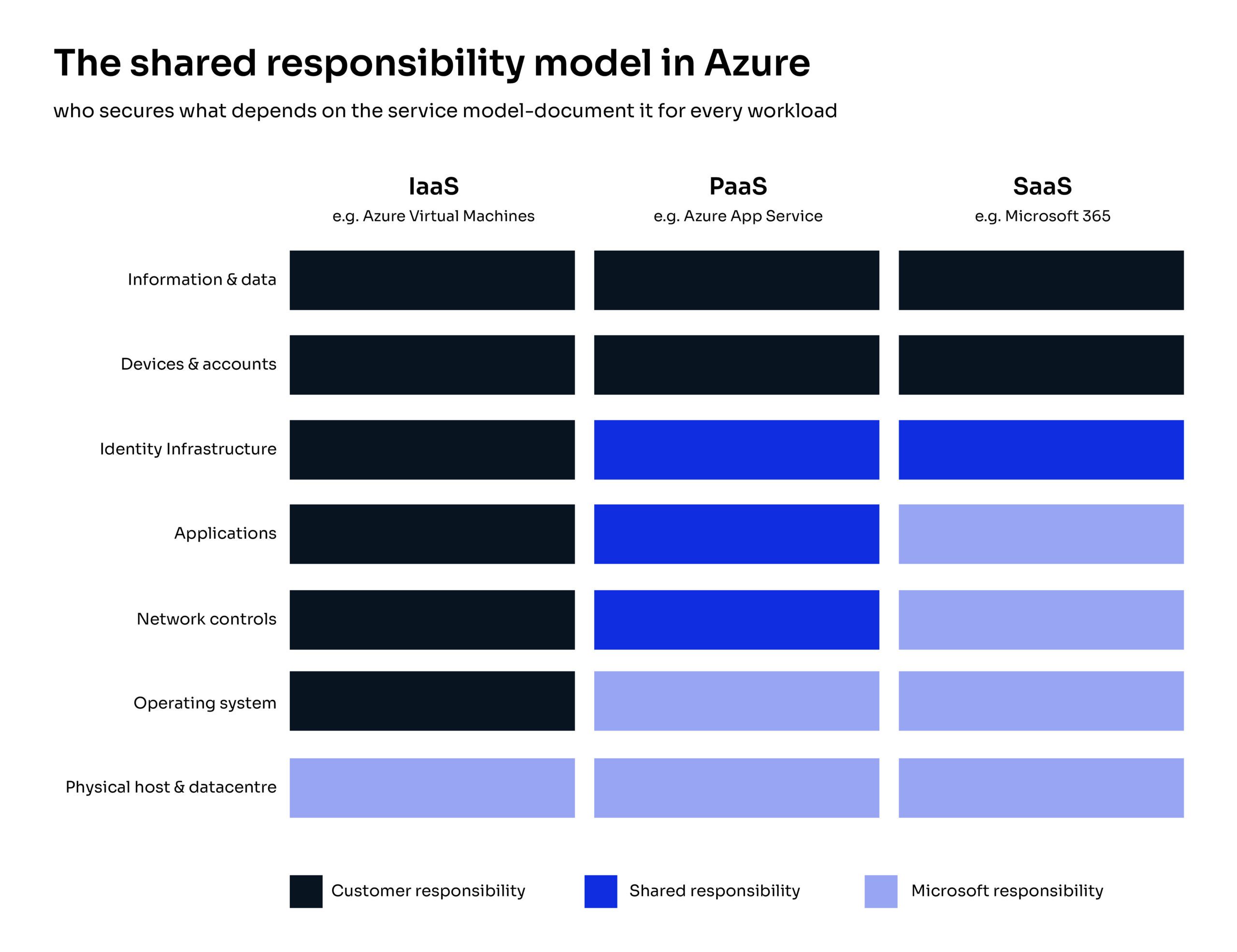
Cloud migration security operates through a shared responsibility model. Microsoft protects the underlying cloud infrastructure, while customers remain accountable for areas including data, identities, access and workload configuration.
The exact division depends on the service model. With Infrastructure as a Service (IaaS), such as Azure Virtual Machines, the customer retains more responsibility for operating systems, applications and network controls. Microsoft assumes more operational responsibility when organizations use managed Platform as a Service (PaaS) or Software as a Service (SaaS) offerings.
Microsoft’s migration guidance highlights shared responsibility, hybrid visibility and unified threat detection as core security considerations. Microsoft also recommends using cloud capabilities to strengthen detection and response rather than transferring on-premises practices unchanged.
Where do Azure migrations create security gaps?
- Identity and privileged access: Dormant accounts, standing administrator privileges and weak authentication can become cloud attack paths.
- Governance: Missing subscription structures, ownership rules, naming standards and Azure Policy assignments lead to inconsistent security controls, policy violations, unmanaged resources, and configuration drift.
- Data protection: Unclassified data may be moved to the wrong region, storage tier or access model.
- Compliance: Retention, audit logging, data residency and reporting requirements may change across Azure regions.
- Legacy systems: Unsupported operating systems and tightly coupled applications can remain exposed within a hybrid estate.
What should a cloud migration security assessment examine?
A cloud migration security assessment should establish what is moving, what it depends on, what must protect it and who owns each control.
Two widely followed assessments are the Microsoft Cloud Adoption Security Assessment (CASA) and Zero Trust Assessment which help identify security weaknesses that could increase risk during or after migration. We recommend a broader assessment that provides additional benefits. The readiness assessment determines how individual workloads should move. It combines security-focused assessments with a comprehensive readiness review, which helps determine not only whether workloads are secure to migrate, but also how they should be migrated, governed and operated in Azure.
Which controls should be ready before migration?
Cloud migration security is strongest when minimum controls are built into the Azure environment before the first production workload arrives.
Is lift-and-shift less secure than modernization?
Lift-and-shift is not automatically insecure, but it can transfer outdated configurations, excessive permissions and vulnerable software into Azure. Modernization creates opportunities to replace those weaknesses with managed services and cloud-native controls.
The best approach is workload-specific. A stable application may be safely rehosted when controls are strengthened first. A fragile or unsupported application may require remediation or modernization before migration. Fortude’s analysis of lift-and-shift Azure migration pitfalls examines the related governance, performance and operational risks.
How should security continue after a cutover?
Cloud migration security continues after go-live because permissions, configurations, resources and threats change continuously. Continuous monitoring through a Security Information and Event Management (SIEM) platform helps organizations maintain visibility across their Azure environment, detect suspicious activity, correlate security events and respond to emerging threats before they escalate.
Post-migration activities should include:
- Reviewing privileged access and inactive identities
- Monitoring configuration drift and exposed resources
- Tracking Microsoft Defender for Cloud recommendations
- Using Microsoft Sentinel to collect, analyze and correlate security events across cloud and hybrid environments
- Investigating incidents and hunting for threats using Microsoft Sentinel workbooks, queries and threat intelligence capabilities
- Testing backup restoration and incident-response procedures
- Reviewing compliance evidence and policy exceptions
- Updating workload architecture as risks and business needs change
Defender for cloud can assess posture, prioritize recommendations and track assigned compliance standards. Its risk model considers factors such as exposure, data sensitivity, lateral movement and exploitability. Microsoft Sentinel complements this by providing SIEM and security orchestration capabilities, enabling security teams to monitor, investigate and respond to threats across the Azure environment from a centralized platform. Security findings should still have named owners, remediation deadlines and exception processes.
When is an Azure cloud security partner worth considering?
External support is most valuable when an organization has regulated workloads, a complex hybrid estate, limited Azure expertise or unclear ownership across internal teams.
This is where a capable partner can step in to assess readiness before proposing migration tooling. The engagement should produce an actionable roadmap covering identity, landing-zone design, governance, compliance, workload sequencing and ongoing support.
Fortude supports this through Azure readiness workshops, security posture and compliance assessments, Azure well-architected reviews, Azure Landing Zone reviews, tenant governance and ongoing optimization. Fortude helps enterprises assess their Azure environment, establish practical security controls and create a roadmap for deployment and ongoing optimization. Schedule an Azure CAF Accelerated Review to identify readiness, governance and security gaps before your next migration wave.