Service Offerings

Explore tailored services designed to solve business challenges and support growth

Industries

Discover industry-focused expertise built to meet unique business needs

Partners

Meet our service partners who strengthen delivery and support client success

Meet our service partners who enhance our capabilities, strengthen service delivery, and help drive successful outcomes for our clients.

Learn how to modernize data foundations to enable trusted, scalable AI.

Global supply chain leader in apparel embarks on unified analytics strategy with Microsoft Fabric

See how a unified data strategy built faster insights and scaled analytics.

Microsoft solutions partner for Data & AI

Products

Explore our digital products built to streamline work and drive growth every day

Partners

Meet our product partners who enhance our solutions and expand client value

AI-powered automated
 regression testing: Your
kickstart for 2026

Explore a better way to speed up testing and improve release quality.

Resources

Access blogs, case studies, events, and insights that support smarter decisions.

Latest Resources

CASE STUDY

HamiltonJet transforms regression testing on Infor CloudSuite with Fortest

NEWS

Fortude earns Microsoft Azure Infrastructure Solutions designation

Our People

Discover a culture where you can grow and shape what’s next

Everyone can grow at Fortude

We believe in creating a global workplace where everyone can grow. This is amplified by our teams, who say the best thing about Fortude is our culture, one that is brought to life by a diverse team that spans across continents.

Latest

Fortude builds momentum for women in tech with all-female Ignite 2.0 tech internship

Aug 22, 2025

Pioneering innovation and inculcating learning in the age of AI

Aug 01, 2024

About us

Learn who we are, what we do, and the values that drive our growth

News & events

Stay updated with Fortude news, events, stories, and company highlights.

Contact us

Get in touch with our team to ask questions or start a conversation

Your nearest office- Sri Lanka

Fortude (Pvt) Ltd
146 Kynsey Road, Colombo 7, Sri Lanka

Email – talk-to-us@fortude.co
Phone – +94 11 453 1531

What defines us goes beyond what we do

Every day, we bring together diverse perspectives, strong leadership and responsible thinking to build a business that creates lasting value for our clients, people and communities.

Fortude secures major Solutions Partner achievement with Analytics on Microsoft Azure Specialization

Office locations

AI and Digital Advisory

Making the most of your data with Infor-Ephesoft integration

4 MIN READ

May 3, 2021

Share

Introduction

Businesses generate mountains of data throughout the supply chain and at various customer and partner touchpoints. Leveraging these data is one of the critical goals for enterprises driven by innovation and as it helps them be more competitive, productive, and digital. How efficient is your enterprise in capturing and transforming these data and integrating them with day-to-day operations?

Developed in partnership with Ephesoft, IDM Capture is an add-on that integrates Infor Document Management (IDM) with Ephesoft’s intelligence document processing technology. IDM Capture enriches the functionality of IDM by capturing and classifying data from scanners, copiers, folders, email accounts, mobile devices, legacy content systems and feeding the validated data to Infor applications.

While Ephesoft’s intelligent document processing capabilities profoundly reduce the human effort, the integration with IDM—enabled by the IDM Capture add-on—allows enterprises to leverage data to the fullest.
Document properties, attributes, and access control

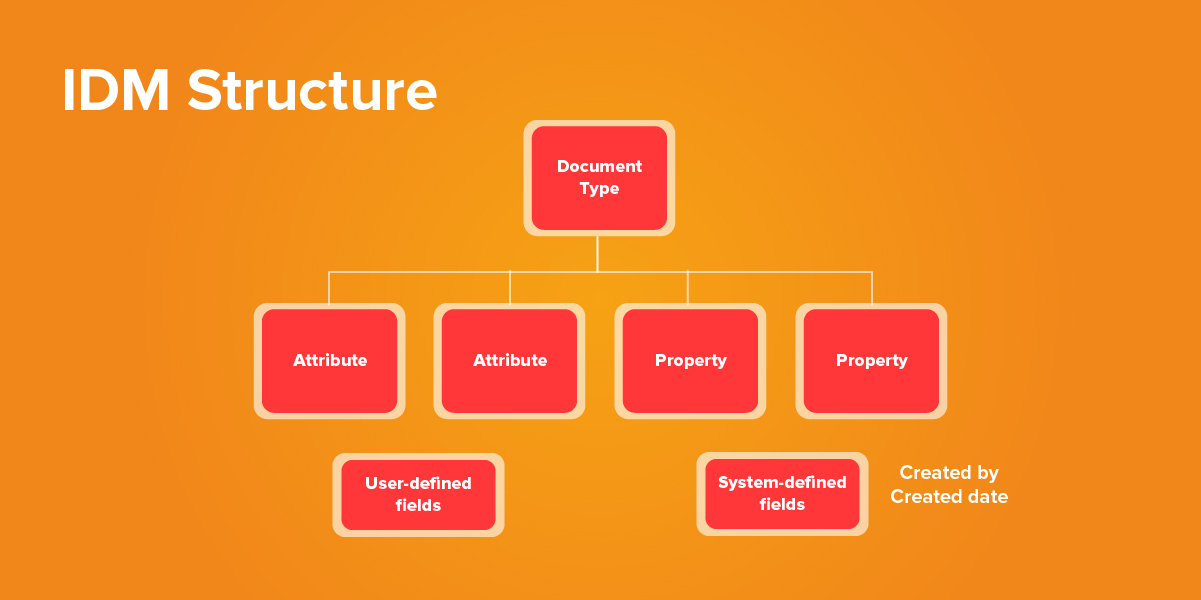
A document in IDM is a file wrapped with properties, attributes, and access control settings. Every document that you upload is sorted into a document type. These documents have attributes, which are user-defined fields, which can be anything you want. Attributes allow links to be created between your documents and your applications. Documents also have system-defined fields such as who created the document, when it was created, and the size of the file.

IDM provides an extensive list of document types, and you have the option to create additional ones as well. You can also remove or modify the attributes associated with the various document types. 

Figure 1 : Basic Structure of IDM

In-context data

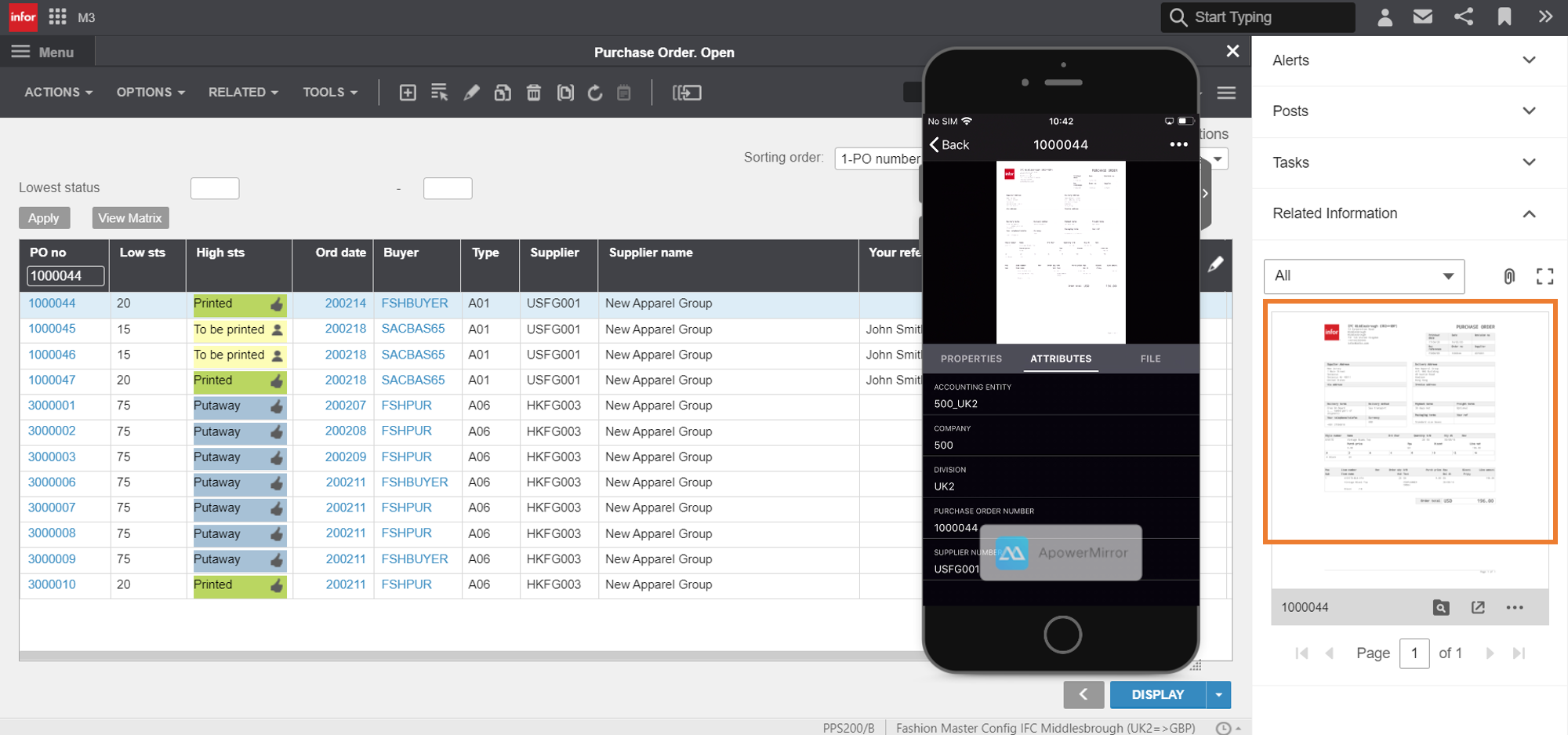
One of the core features of IDM is that it allows users in-context access to documents, connecting documents and business data with external applications such as ERPs or Infor OS. This allows users to perform their daily operations faster, improving accuracy and productivity. Also, authentication enforced by Infor Grid and role-based authorization for document access ensures security.

Figure 2 : Infor CloudSuite displaying a purchase order linked to a record.
Documents can be viewed on the Infor Go mobile app as well.

Integrate data with workflows with real-time alerts

IDM can be integrated with ION to automate manual processes and workflows. For example, when an invoice comes into the system, the pre-built custom workflows will automatically handle the routing, tracking, and approval using an ION workflow. If the system detects an error or an exception, notifications and alerts can be triggered.

Find data with advanced search capabilities

Once the data is in IDM, business users can use advanced search functionalities in IDM to locate data.

IDM uses multiple methods to search for a document:

  • Free-text search: Type in a keyword, and IDM will go through metadata, attributes, or the document itself to find documents associated with the keyword.
  • Search filter: Execute a search by filling in the filter criteria to do your search as specific by your needs.
  • Advanced search: Uses XQuery language used by IDM to directly search the repository. You can use this method to recreate or modify the searches in the future.
  • Shortcut: Quickly find documents that you have created, checked out, or deleted.

Once you find a document through search, you can view, export, print, or email them.

FAQ

Make data-driven decisions with BI

If your enterprise relies on business intelligence and analytics tools such as Infor Birst or Microsoft Power BI, IDM Capture can greatly assist your BI applications by feeding them clean, accurate data.

Birst, Infor’s cloud intelligence, and analytics platform, can further refine the information fed through IDM Capture by transforming them to visualizations and dashboards, helping business users derive actional insights and make time-critical decisions quickly.

~

IDM Capture is a bridge that connects your Infor ecosystem with unstructured data from numerous sources and channels. While helping your business users capture data, IDM Capture can help enterprises transform data into valuable insights, an invaluable asset in the path to digital transformation and a tool that will help businesses stay competitive.

To learn more about how you can leverage IDM Capture, register, and join the upcoming webinar – An intelligent document and data onramp to your Infor ERP co-hosted by Ephesoft and Infor.

FAQ

CONTENTS

Introduction
Document properties, attributes, and access control
In-context data
Integrate data with workflows with real-time alerts
Find data with advanced search capabilities
Make data-driven decisions with BI

Receive the latest
Fortude Newsletter
updates.

Share

Receive the latest
Fortude Newsletter
updates.

Share