Service Offerings

Explore tailored services designed to solve business challenges and support growth

Industries

Discover industry-focused expertise built to meet unique business needs

Partners

Meet our service partners who strengthen delivery and support client success

Meet our service partners who enhance our capabilities, strengthen service delivery, and help drive successful outcomes for our clients.

Learn how to modernize data foundations to enable trusted, scalable AI.

Global supply chain leader in apparel embarks on unified analytics strategy with Microsoft Fabric

See how a unified data strategy built faster insights and scaled analytics.

Microsoft solutions partner for Data & AI

Products

Explore our digital products built to streamline work and drive growth every day

Partners

Meet our product partners who enhance our solutions and expand client value

AI-powered automated
 regression testing: Your
kickstart for 2026

Explore a better way to speed up testing and improve release quality.

Resources

Access blogs, case studies, events, and insights that support smarter decisions.

Latest Resources

CASE STUDY

HamiltonJet transforms regression testing on Infor CloudSuite with Fortest

NEWS

Fortude earns Microsoft Azure Infrastructure Solutions designation

Our People

Discover a culture where you can grow and shape what’s next

Everyone can grow at Fortude

We believe in creating a global workplace where everyone can grow. This is amplified by our teams, who say the best thing about Fortude is our culture, one that is brought to life by a diverse team that spans across continents.

Latest

Fortude builds momentum for women in tech with all-female Ignite 2.0 tech internship

Aug 22, 2025

Pioneering innovation and inculcating learning in the age of AI

Aug 01, 2024

About us

Learn who we are, what we do, and the values that drive our growth

News & events

Stay updated with Fortude news, events, stories, and company highlights.

Contact us

Get in touch with our team to ask questions or start a conversation

Your nearest office- Sri Lanka

Fortude (Pvt) Ltd
146 Kynsey Road, Colombo 7, Sri Lanka

Email – talk-to-us@fortude.co
Phone – +94 11 453 1531

What defines us goes beyond what we do

Every day, we bring together diverse perspectives, strong leadership and responsible thinking to build a business that creates lasting value for our clients, people and communities.

Fortude secures major Solutions Partner achievement with Analytics on Microsoft Azure Specialization

Office locations

AI and Digital Advisory

Infor GO — The Future of Infor Mobility

4 MIN READ

July 28, 2020

Share

Introduction

Mobility is fast becoming the future of ERP. There is a growing need for mobile apps that extends the ERP functionality to its business users, allowing them to make informed business decisions on the go.

A key part of Infor’s mobility strategy, Infor Go, is a mobile application that allows for a synchronized enterprise experience. The app allows users to access Infor applications via mobile devices, enabling immediate action and analysis with increased data accessibility. The Infor Go mobile application is available for iOS and Android devices. It provides a centralized access point for Infor applications as well as role-based access to proprietary applications created using Infor Mongoose.

The app has a user-friendly UI that offers mobile functionality for many Infor modules, including:

  • Ming.le – Check alerts and approvals. Monitor tasks that need to be completed. Access Homepage widgets.
  • Coleman Digital Assistant – Enable conversational relationships using AI to optimize day-to-day work.
  • Mongoose apps – Access business-specific applications created using Mongoose and deliver alerts for tasks and approvals to your mobile device. You can approve transactions, monitor KPIs or streamline other business process flows and capture useful data.
  • Profile management – Check and edit your profile.

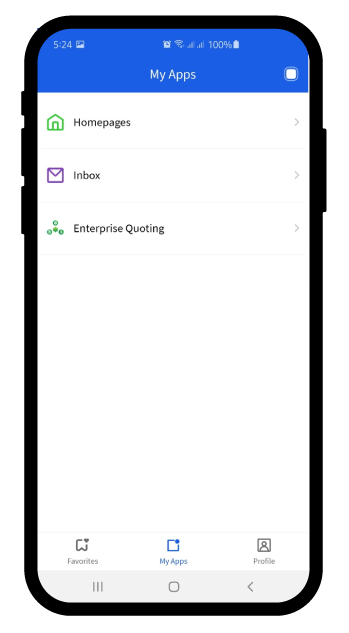
Once you sign in to the Infor Go application, you will see the My Apps tab. It will list all the applications you have access to.

Viewing notifications and alerts

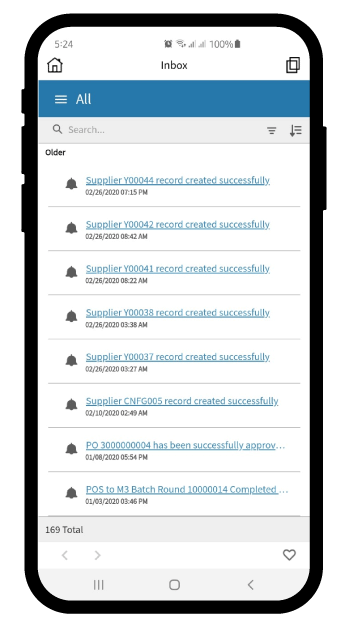
The Inbox in the Infor Go app displays workflow notifications.

More information

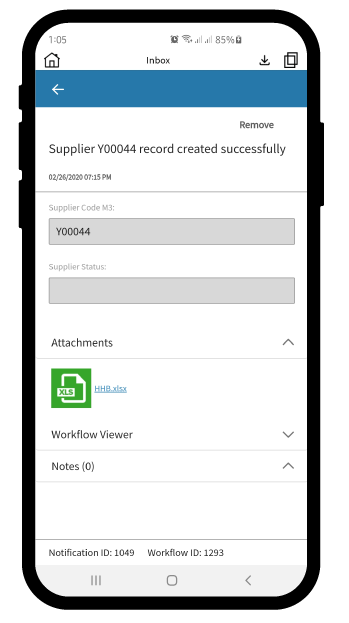
By clicking on a notification, users can see further information such as attachments and notes related to the workflow.

Using the Workflow Viewer

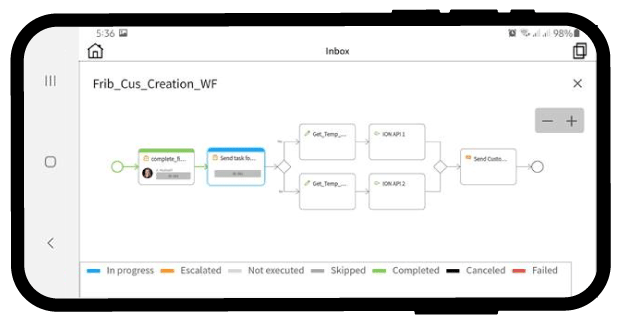
The following image depicts a workflow for a customer creation process. Starting from creating the finance details to sending the customer creation notification email, the workflow indicates the status of each task within the process. The workflow widget assigns colors to each task so that users can quickly identify the status of the tasks as In progress, Escalated, Not executed, Skipped, Completed, Cancelled, or Failed.

Bookmarking pages and apps

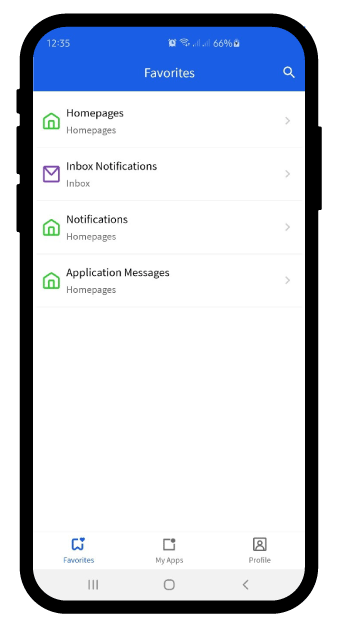
The Infor Go app allows bookmarking individual pages and applications. Once bookmarked, the pages and applications will appear in the Favorites tab for quick access.

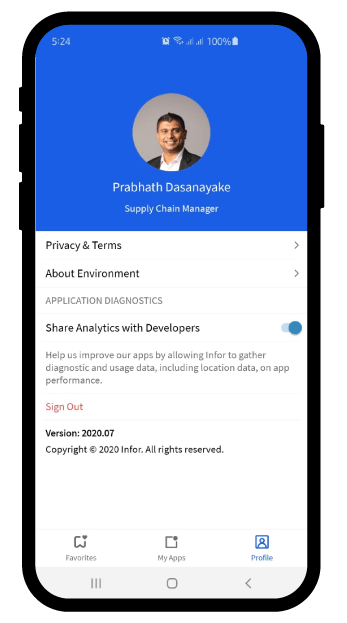
In the Profile tab, users can change the profile picture and view information about the app and the environment.

Fortude consultants can help you configure, deploy, and onboard Infor Go app for your enterprise, along with other Infor mobile apps such as Ming.le and Infor Document Management (IDM).

Want to give Infor Go a try? Download the app for Android and iOS devices below:

Part 1: Four reasons why Infor ION can make your enterprise application experience better

Part 2: Seamless business document management with Infor Document Management (IDM)

Part 3: Bringing information closer to business users with Infor Ming.le

FAQ

CONTENTS

Introduction
Viewing notifications and alerts
More information
Using the Workflow Viewer
Bookmarking pages and apps

Receive the latest
Fortude Newsletter
updates.

Share

Receive the latest
Fortude Newsletter
updates.

Share