Explore tailored services designed to solve business challenges and support growth
Discover industry-focused expertise built to meet unique business needs
Meet our service partners who strengthen delivery and support client success
Meet our service partners who enhance our capabilities, strengthen service delivery, and help drive successful outcomes for our clients.

Learn how to modernize data foundations to enable trusted, scalable AI.
See how a unified data strategy built faster insights and scaled analytics.
Explore our digital products built to streamline work and drive growth every day
Meet our product partners who enhance our solutions and expand client value
Explore a better way to speed up testing and improve release quality.
Access blogs, case studies, events, and insights that support smarter decisions.
We believe in creating a global workplace where everyone can grow. This is amplified by our teams, who say the best thing about Fortude is our culture, one that is brought to life by a diverse team that spans across continents.
Learn who we are, what we do, and the values that drive our growth
Stay updated with Fortude news, events, stories, and company highlights.
Get in touch with our team to ask questions or start a conversation
Your nearest office- Sri Lanka
Fortude (Pvt) Ltd
146 Kynsey Road, Colombo 7, Sri Lanka
Email – talk-to-us@fortude.co
Phone – +94 11 453 1531
Every day, we bring together diverse perspectives, strong leadership and responsible thinking to build a business that creates lasting value for our clients, people and communities.
Your nearest office- Sri Lanka
Fortude (Pvt) Ltd
146 Kynsey Road, Colombo 7, Sri Lanka
Email – talk-to-us@fortude.co
Phone – +94 11 453 1531
In the previous blog post, we discussed building low-code feature-rich CloudSuite applications with Infor Mongoose. In this article, we explore applications developed using Infor Mongoose at Fortude.
We have used M3 Mongoose Plug-in (M3 APIs), ION API wizard (ION APIs), REST APIs, Form Scripts, Global Scripts, IDO extension classes, and other capabilities for these developments with the Mongoose framework. However, with the latest Mongoose upgrade, the M3 Mongoose Plug-in has been replaced with the ION API wizard. Therefore, we have changed our current M3 Mongoose Plug-in-related development into ION APIs.
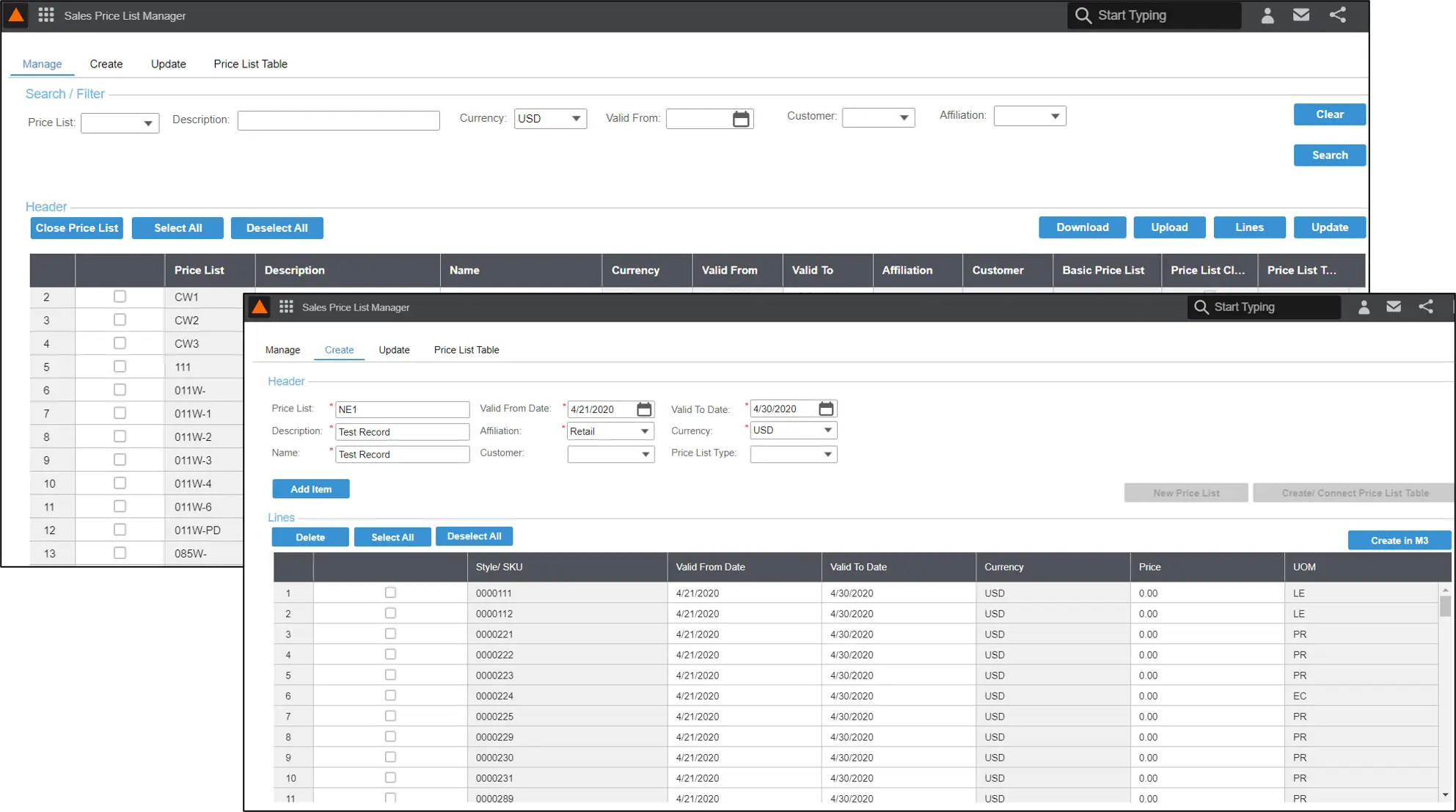
It’s common for businesses to run multiple programs to complete the price list workflow in Infor M3. Therefore, the Sales Price List Manager application was developed to manage price lists from a centralized location conveniently.
The Sales Price List Manager process uses the standard M3 programs OIS017 (Sales Price List) and OIS012 (Sales Price List Table) and communicates with M3 via ION APIs, Web Services, and SQL queries. This application is categorized into three main functions: manage, create, and update.

Figure 1: Sales Price List Manager
Features of Sales Price List Manager:
The Price List Manager allows you to easily create and publish price lists by incorporating all these features into one page.
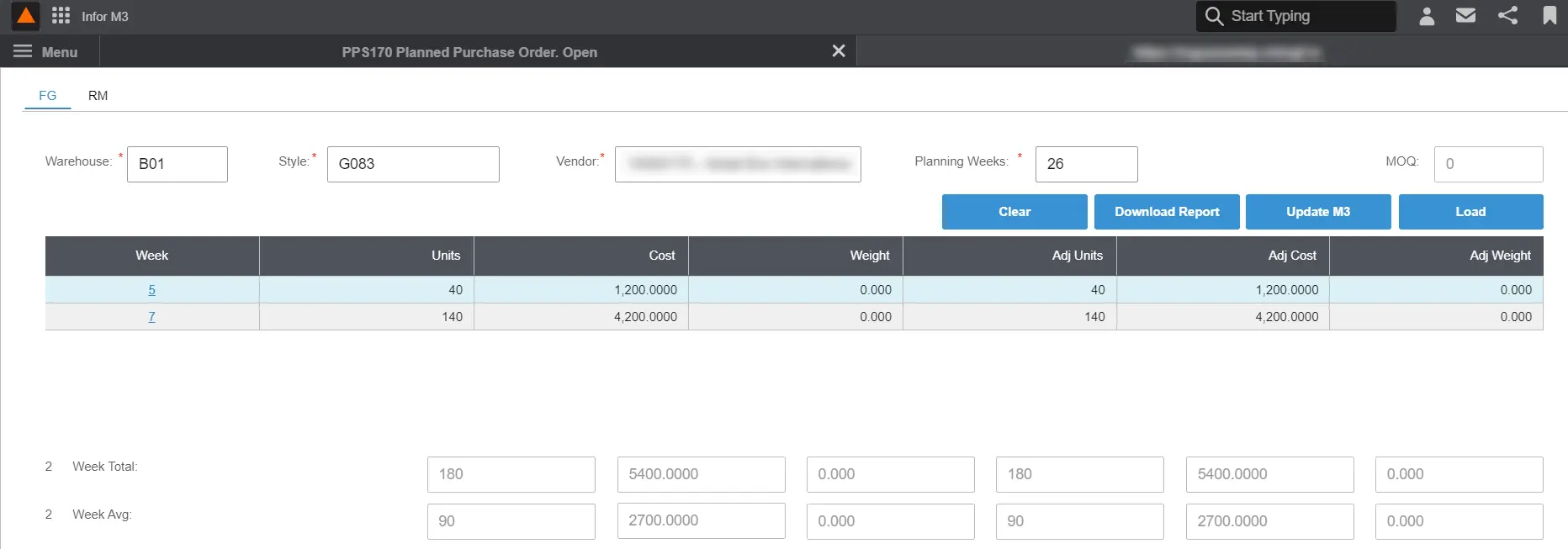
POP Consolidator allows Supply Chain Management users to consolidate the purchase order proposals generated by MRP (Material Requirement Planning) in M3. In this application, users can view the purchase order proposals auto-generated by the MRP function in M3 in weekly buckets against a specific style/vendor. Further, they can compare the proposed quantities against the MOQ (Minimum Order Quantity) levels against the selected style/vendor combination. POP Consolidator also allows the users to fit the proposal quantities against the vendor MOQ by changing the requested delivery date and swopping the POPs across different weeks.

Figure 2: Purchase Order Proposal Consolidator
Finish Goods (FG) and Raw Materials (RM) are processed separately, facilitating the same features.
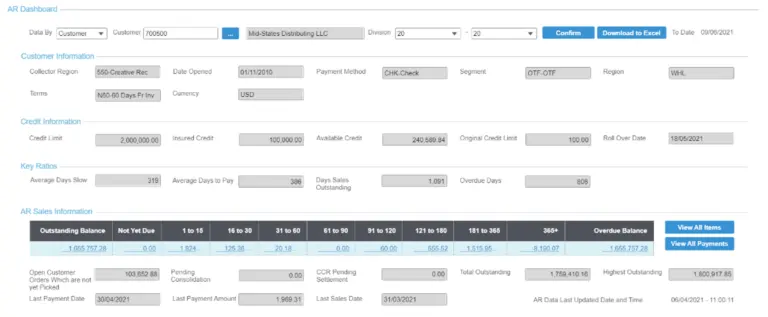
How convenient would it be for the AR (Account Receivable) team to have an insightful dashboard to keep up-to-date with all the crucial customer-related metrics they use daily? The AR Dashboard offers real-time insights at your fingertips for timely, accurate decision making.
When the user enters transactions in AR Sales, the M3 database captures the data. The captured data is then pushed to the Data Lake and is transferred to the MDM (Master Data Management) database. AR Dashboard then retrieves data from the MDM database using REST APIs and displays them in a series of subforms and grids as pop-up windows. In addition, all forms support the MS Excel download function.

Figure 3: Accounts Receivable (AR) Dashboard
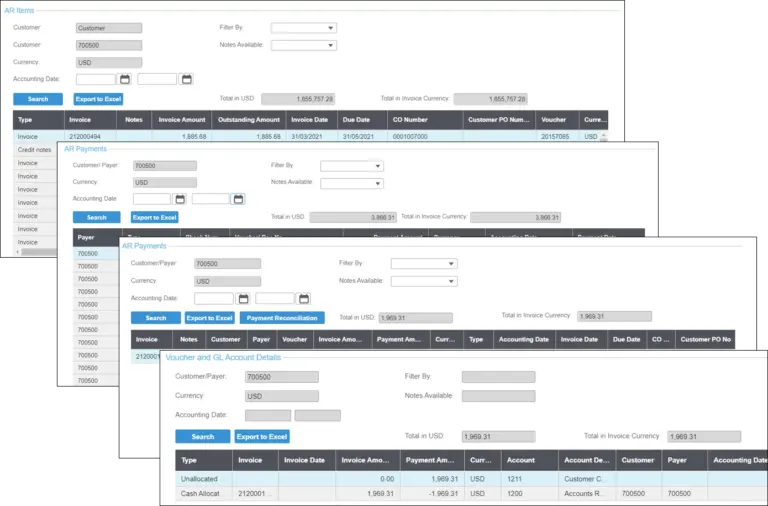
As mentioned above, this application contains a list of sub forms and grids.
AR Dashboard – Displays customer Information, credit Information, key ratios, and AR sales information of the selected customer with additional summary details. The two buttons in ‘View All Items’ and View All Payments’ are linked to AR Items and AR Payments screens, respectively.
AR Items – Displays all transactions (invoices, credit notes, debit notes, account payments), outstanding balance, and age bucket drill-down.
AR Payments – Displays the summary details of payments as well as invoice level details of the payment. Additionally, the Voucher/Doc No of each record is linked to the AR Payments Details screen.
AR PaymentDetails – Displays payment details, voucher items drill-down. The Payment Reconciliation button is linked to Voucher and GL Account Details screen.
Voucher and GL Account Details – Displays further details of voucher and GL accounts.

Figure 4: List of sub forms and grids
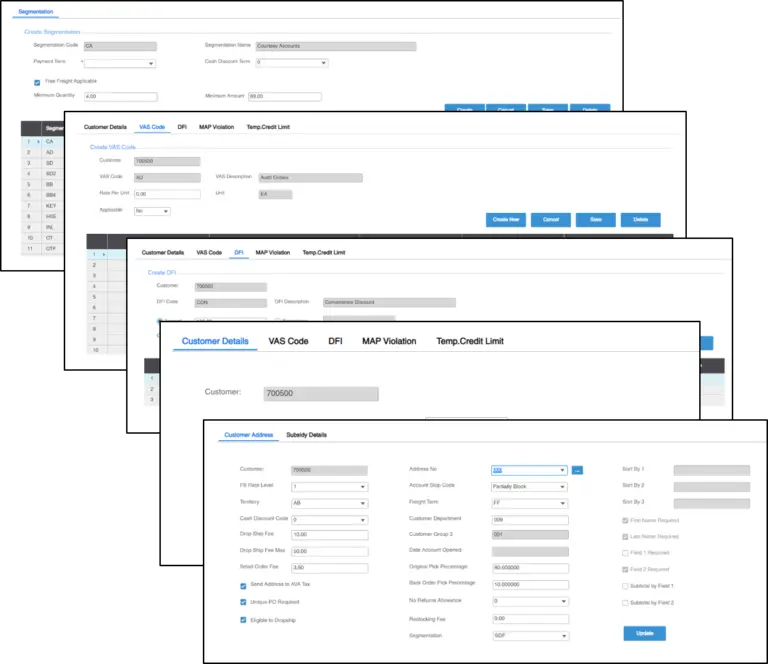
Customer Enhancement Screen (CES) was designed to enter and manage customer and customer address-related ‘additional’ information in M3 through one interface. Segmentations, MAP violations, Deduct From Invoice (DFI) Details, and Temporary Credit Limits can also be created and managed using this application.
CES mainly consists of three modules: Customer Details, Customer Address Details, and Customer Segmentations screens.

Figure 5: Customer Enhancement Screen
Customer Details
Customer Address Details
Customer Segmentation
In the next post, we will discuss the Fortude Roadmap for M3 Extension Development on Infor Mongoose.
Part 01 : Building low-code feature-rich applications for CloudSuite with Infor Mongoose
Written by:
Associate Technical Consultant, Fortude
Technical Consultant, Fortude