
Service Offerings

Explore tailored services designed to solve business challenges and support growth

Industries

Discover industry-focused expertise built to meet unique business needs

Partners

Meet our service partners who strengthen delivery and support client success

Meet our service partners who enhance our capabilities, strengthen service delivery, and help drive successful outcomes for our clients.

Learn how to modernize data foundations to enable trusted, scalable AI.

Global supply chain leader in apparel embarks on unified analytics strategy with Microsoft Fabric

See how a unified data strategy built faster insights and scaled analytics.

Microsoft solutions partner for Data & AI

Products

Explore our digital products built to streamline work and drive growth every day

Partners

Meet our product partners who enhance our solutions and expand client value

AI-powered automated
 regression testing: Your
kickstart for 2026

Explore a better way to speed up testing and improve release quality.

Resources

Access blogs, case studies, events, and insights that support smarter decisions.

Latest Resources

CASE STUDY

HamiltonJet transforms regression testing on Infor CloudSuite with Fortest

NEWS

Fortude earns Microsoft Azure Infrastructure Solutions designation

Our People

Discover a culture where you can grow and shape what’s next

Everyone can grow at Fortude

We believe in creating a global workplace where everyone can grow. This is amplified by our teams, who say the best thing about Fortude is our culture, one that is brought to life by a diverse team that spans across continents.

Latest

Fortude builds momentum for women in tech with all-female Ignite 2.0 tech internship

Aug 22, 2025

Pioneering innovation and inculcating learning in the age of AI

Aug 01, 2024

About us

Learn who we are, what we do, and the values that drive our growth

News & events

Stay updated with Fortude news, events, stories, and company highlights.

Contact us

Get in touch with our team to ask questions or start a conversation

Your nearest office- Sri Lanka

Fortude (Pvt) Ltd
146 Kynsey Road, Colombo 7, Sri Lanka

Email – talk-to-us@fortude.co
Phone – +94 11 453 1531

What defines us goes beyond what we do

Every day, we bring together diverse perspectives, strong leadership and responsible thinking to build a business that creates lasting value for our clients, people and communities.

Fortude secures major Solutions Partner achievement with Analytics on Microsoft Azure Specialization

Office locations

Data & AI

Migrate Data to Infor MT Faster with M3 Data Import Tool

5 MIN READ

August 25, 2021

Share

Introduction

When enterprises leave behind legacy systems for flexible, scalable, and reliable solutions in the cloud, successful data migration plays a key role in ensuring business continuity. Yet, according to Gartner, 83% of data migrations fail or exceed the schedule. How can enterprises empower IT teams and users to move data efficiently?

The M3 Data Import Tool for Multi-Tenant (MDI-MT) tool developed by Fortude provides a reliable and efficient interface to import transactional and master data.

When can you use MDI-MT?

Enterprises can use MDI-MT to move transactional, master, and other data from Infor and non-Infor legacy systems to multi-tenant cloud solution offered by Infor, such as CloudSuite Fashion and CloudSuite Food and Beverage.

MDI-MT can also help in any other scenario where an enterprise may want to move data between systems or when it is necessary to make mass updates to data.

Who can use MDI-MT?

MDI-MT is a lifesaver for enterprises and system integrators that want to move large volumes of M3 data to the Infor multi-tenant cloud products such as CloudSuite, and for enterprise IT teams that need to move data between entities.

MDI-MT supports both backend and web authentication via ION APIs.

A closer look at the user interface and key features of MDI-MT

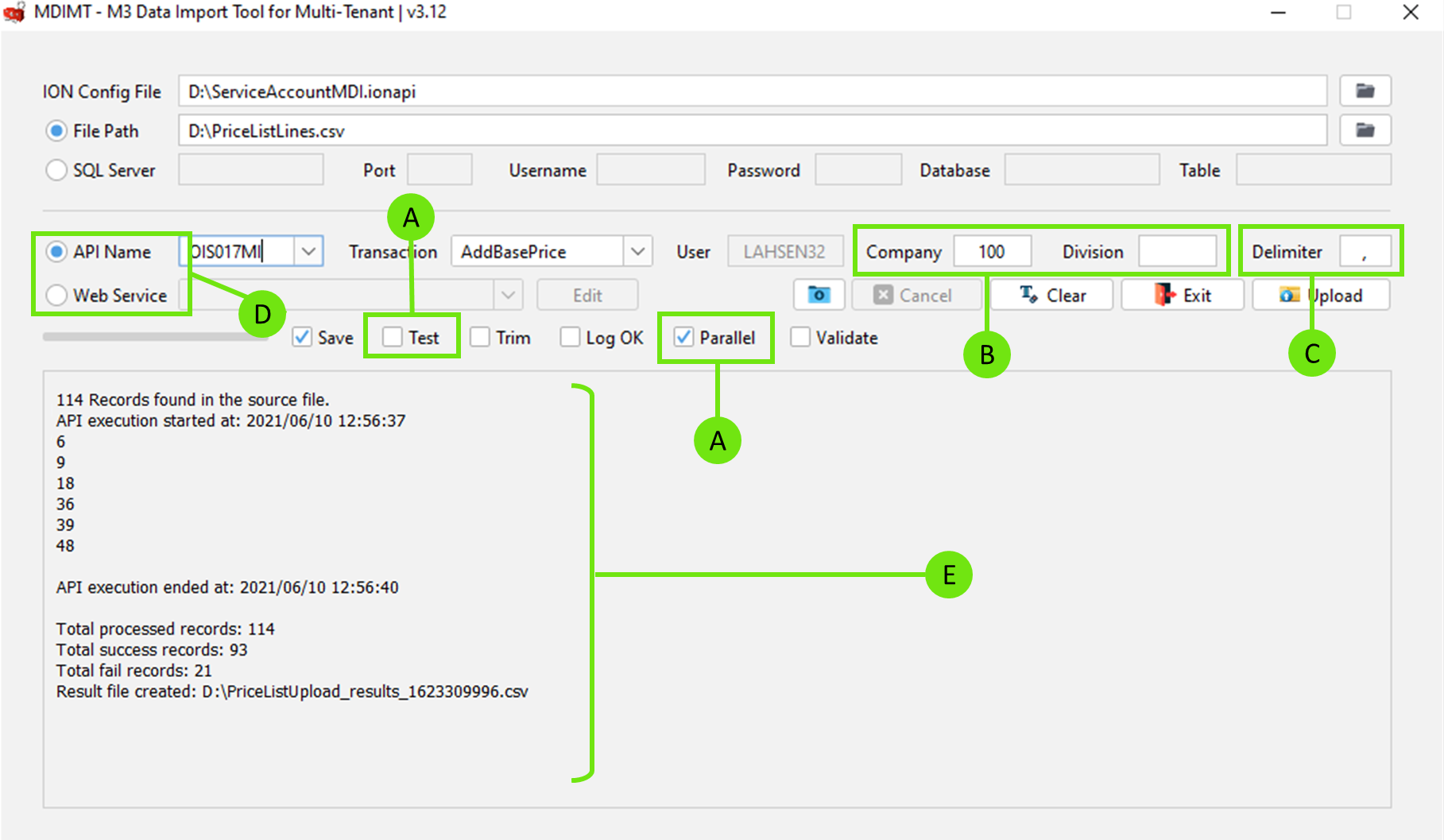
Figure 1: The intuitive user interface of the M3 Data Import Tool for Multi-Tenant tool

A. Process millions of transactions with parallel processing

Traditional data import tools process transactions sequentially. MDI-MT can concurrently process large volumes of transactions in batches. For example, if you want to upload 100,000 historical transactions, MDI-MT will arrange these transactions into 50 groups, each containing 2000 transactions, and start processing them parallelly.

Assuming that it takes one second to process one transaction, sequential processing will take 100,000 seconds (2.7 hours) to complete the data upload. MDI-MT can upload 100,000 transactions within 33.3 minutes.

Using MDI-MT, a leading luxury lifestyle brand in the UK reduced data upload time from days to hours during several critical data migration exercises.

Figure 2: With MDI-MT, a leading fashion manufacturer reduced the data upload time by 83%.

MDI-MT can even handle 10 million transactions per run provided that the client, server, and the API can support the load.

FAQ

B. Change the company and division

MDI-MT allows you to change the company and division to which you want to upload data. This way, users can upload data without changing the company and division assigned to them in M3.

FAQ

C. Use custom delimiters

Similar to the EVS100 program in M3, MDI-MT allows uploading data using CSV (comma-separated values) files. The advantage of using CSV files is that they consume less memory; thus, they can contain large volumes of data and be processed faster.

But what if you are importing addresses of consumers to your CloudSuite? A CSV file delimited by commas will not be able to separate addresses from other values. To rectify this issue, you can set a different character such as the vertical bar/pipe (|) or semicolon (;) when generating the CSV file. Most operating systems such as Windows and macOS allow users to change the list separator character from the regional settings.

If you use the same list separator character defined in the operating system in the Delimiter textbox, MDI-MT will successfully import your consumer address data.

FAQ

D. Upload data via REST API and M3 Web Services

MDI-MT supports uploading data via both REST API and M3 Web Services (MWS).

Upload data with an auto-generated template

When uploading data using the API, MDI-MT allows you to upload data using a CSV template. To download the template, select the API and click the download icon. When downloading, you can select whether you want to only have the headers or have helpful metadata such as fields, field name, field length, field type, and mandatory/optional nature of a field.

Figure 3: Upload data with an auto-generated template

Cover more ground with M3 Web Services (MWS)

The ability to upload data via web services is important as the API does not support updating all data. When using web services to upload data, MDI-MT allows you to match the M3 program fields with CSV headers through an XML file.

Figure 4: M3 Data Import Tool for Multi-Tenant | Web Service Editor

FAQ

E. See a summary of the data upload job

Once MDI-MT completes uploading data, it shows you a comprehensive summary of the data upload task. If any, the summary includes the number of records that failed to upload and points you to a CSV file where you can get granular visibility into each record.

If you select Log OK before executing the upload, the summary will include details about the transactions that were successfully processed.

FAQ

F. Check the sanity of data before uploading

If you select the Test checkbox before executing the data upload job, MDI-MT will only upload the first five rows of the dataset. This allows you to perform a sanity test on the dataset before uploading large volumes of transactions.

If the test upload completes with errors, you can fix the errors (e.g., add the missing columns) and re-run the upload job without enabling the test option.

FAQ

Try MDI-MT with a trial license

MDI-MT comes with a 7-day trial license. After the trial period ends, you need a paid license to continue using MDI-MT.

~

If you want to evaluate the tool with a trial license or learn more about how MDI-MT can serve your enterprise, do get in touch with us at talk-to-us@fortude.wpenginepowered.com.

Written by:

FAQ

CONTENTS

Introduction
When can you use MDI-MT?
Who can use MDI-MT?
A closer look at the user interface and key features of MDI-MT
A. Process millions of transactions with parallel processing
B. Change the company and division
C. Use custom delimiters
D. Upload data via REST API and M3 Web Services
E. See a summary of the data upload job
F. Check the sanity of data before uploading
Try MDI-MT with a trial license

Receive the latest
Fortude Newsletter
updates.

Share

Receive the latest
Fortude Newsletter
updates.

Share