Service Offerings

Explore tailored services designed to solve business challenges and support growth

Industries

Discover industry-focused expertise built to meet unique business needs

Partners

Meet our service partners who strengthen delivery and support client success

Meet our service partners who enhance our capabilities, strengthen service delivery, and help drive successful outcomes for our clients.

Learn how to modernize data foundations to enable trusted, scalable AI.

Global supply chain leader in apparel embarks on unified analytics strategy with Microsoft Fabric

See how a unified data strategy built faster insights and scaled analytics.

Microsoft solutions partner for Data & AI

Products

Explore our digital products built to streamline work and drive growth every day

Partners

Meet our product partners who enhance our solutions and expand client value

AI-powered automated
 regression testing: Your
kickstart for 2026

Explore a better way to speed up testing and improve release quality.

Resources

Access blogs, case studies, events, and insights that support smarter decisions.

Latest Resources

CASE STUDY

HamiltonJet transforms regression testing on Infor CloudSuite with Fortest

NEWS

Fortude earns Microsoft Azure Infrastructure Solutions designation

Our People

Discover a culture where you can grow and shape what’s next

Everyone can grow at Fortude

We believe in creating a global workplace where everyone can grow. This is amplified by our teams, who say the best thing about Fortude is our culture, one that is brought to life by a diverse team that spans across continents.

Latest

Fortude builds momentum for women in tech with all-female Ignite 2.0 tech internship

Aug 22, 2025

Pioneering innovation and inculcating learning in the age of AI

Aug 01, 2024

About us

Learn who we are, what we do, and the values that drive our growth

News & events

Stay updated with Fortude news, events, stories, and company highlights.

Contact us

Get in touch with our team to ask questions or start a conversation

Your nearest office- Sri Lanka

Fortude (Pvt) Ltd
146 Kynsey Road, Colombo 7, Sri Lanka

Email – talk-to-us@fortude.co
Phone – +94 11 453 1531

What defines us goes beyond what we do

Every day, we bring together diverse perspectives, strong leadership and responsible thinking to build a business that creates lasting value for our clients, people and communities.

Fortude secures major Solutions Partner achievement with Analytics on Microsoft Azure Specialization

Office locations

Data & AI

Infor Factory Track: A great companion to M3/CloudSuite

7 MIN READ

November 9, 2020

Share

Introduction

Knowingly or unknowingly, many business organizations choose to live with suboptimal processes and outdated technologies that do not serve them well. This often happens due to financial constraints that prevent businesses from investing in better solutions, or not having knowledge about cost-effective solutions. For businesses that manufacture goods, the challenges are greater, given the unique nature of their operations.

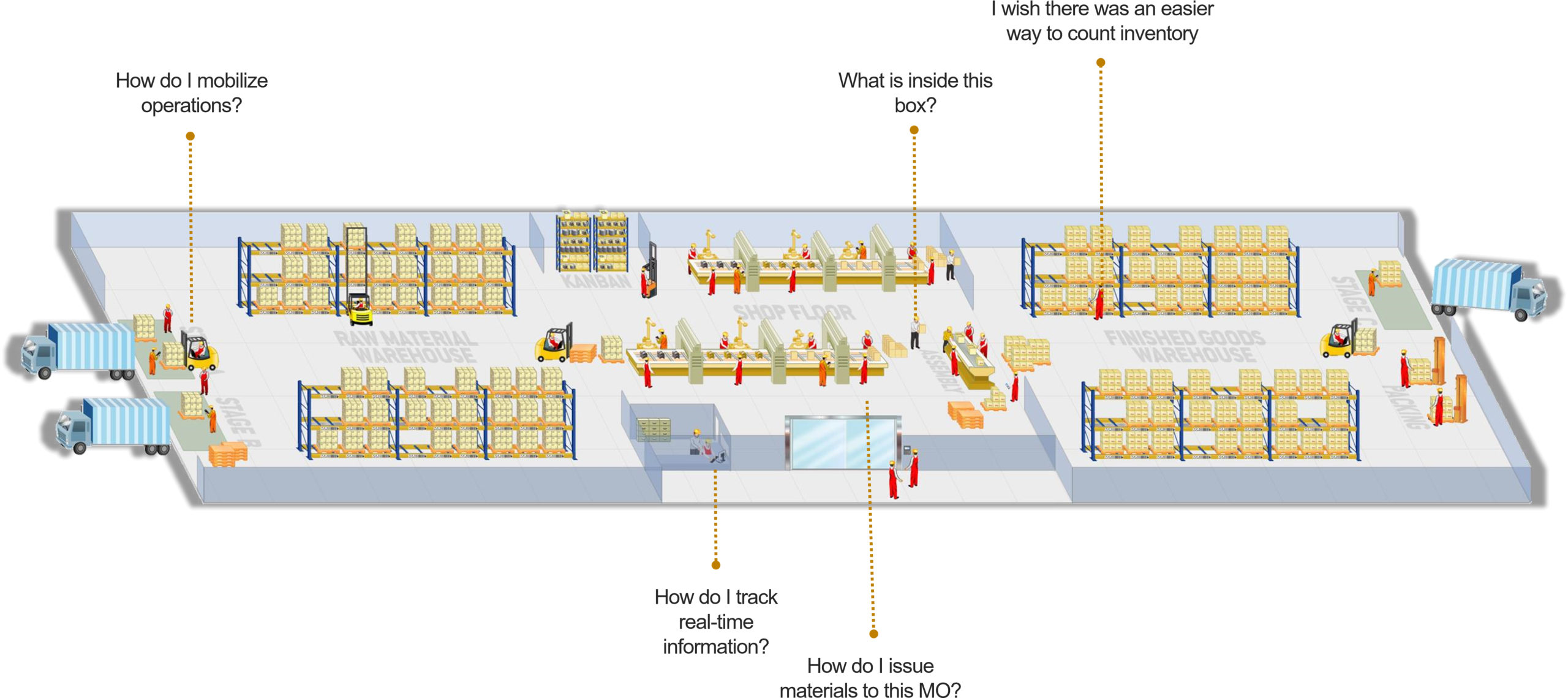
Here are few familiar challenges faced by staff, at various touchpoints in a manufacturing facility:

Figure 01: Business challenges at a manufacturing facility

How do we overcome these business challenges?

The challenges can be divided into two groups: warehouse-related and manufacturing-related. Traditional organizations depend on multiple systems to overcome these challenges:

  1. Warehouse Management System (WMS)
  2. Shop floor management system
  3. Enterprise Resource Planning (ERP) system

Let’s dive into the individual capabilities and drawbacks of these systems.

Warehouse Management Systems

Traditionally, a WMS is a stock-taking system that manages the relationship between inventory transactions (e.g., pick, pack, move) and their physical location, such as the stock zone and storage/bin location.

Capabilities of a typical warehouse management system

  • Inbound processes: Goods receipt, inspection recording, and put away
  • Outbound processes: Picking, packing, and dispatch/shipping
  • In-house processes: Movements, transfers, stock counts, and stock inquiries

Drawbacks

  • Often limited to warehouse functions
  • Often cannot be integrated with other systems such as ERP software

Shop Floor Management Systems

Manufacturing organizations use shop floor management systems to track and report the progress of work in terms of raw materials, operations, and finished goods.

Capabilities of a typical shop floor management system

  • Reporting raw material issue
  • Reporting of manufactured quantities, rejections and operation times such as run time, setup time, and down time

Drawbacks

  • Often limited to shop floor functions
  • Often cannot be integrated with other systems such as ERP software

Enterprise Resource Planning (ERP) Systems

An ERP is a modular system that integrates different functions across several departments in an organization. Its modular nature, integrability, and adaptability make it an ideal solution for facilitating manufacturing and warehousing operations and facing related challenges.

However, the reality is that most business transactions occur in volatile, sub-ideal situations such as inside a cold room of less than 30°F temperature, within a warehouse bay area, or next to a noisy blending machine at a production line. And these transactions are performed by users with varying IT skills, some of whom may not have the necessary IT skills to use an ERP system.

Drawbacks

  • Setting up computer terminals on factory floors takes a lot of space.
  • In a typical 50,000-ft2 warehouse with a large number of locations or bins, users have to walk between computer terminals and docks/loading bays when looking up information or when performing operations. This consumes a lot of time.
  • Computer terminals’ hardware is prone to damage due to wet and messy conditions on the factory floor and due to hard, long-term usage.
  • It is difficult to use the terminals with safety outfits, overalls, gloves, and goggles.
  • Poor user experience: users find it difficult to navigate between programs when entering data. This causes delays between operations and reporting.

Due to these reasons, a standalone ERP system or a combination of a WMS and a shop floor management system often fails to address the challenges faced by users in a shop floor environment.

To alleviate the woes of manufacturing and warehousing operations, Infor has developed a solution: Infor Factory Track. Infor Factory Track can work alongside an ERP as a lightweight mobile companion that works on the ground level to track and absorb all manufacturing and warehousing transactions.

FAQ

What is Infor Factory Track?

Infor Factory track is a highly configurable and comprehensive production automation solution designed specifically for the manufacturing industry. Using Factory Track, manufacturers can manage inventory, track labor, and automate their time and attendance operations.

Factory Track comprises three modules:

Shop Floor module: A work center automation solution that delivers a paper-less kiosk-based interface that can be accessed by multiple production floor operators to track labor, raw material issue and finished goods.

Warehouse Mobility module: Delivers a real-time inventory management solution with barcode support for ease of use. Using Warehouse Mobility, manufacturers can automate various inventory operations, such as material receiving, material movement, cycle counting, and material dispatch.

Time Track module: A comprehensive application that tracks time and attendance of employees. As nearly every manufacturer has specific attendance and labor rules, Time Track provides a configurable solution that allows organizations to set up their own rules concerning attendance and labor, such as shift duration, labor management, absence management, and timesheet tracking.

FAQ

Why Infor Factory Track?

1. Runs on handheld or forklift-mounted touch-sensitive devices. This makes it an ideal solution for use cases that require mobility and rough use.

2. Integrated with the ERP system real time. This makes Infor Factory Track a portable mini ERP, which sends information captured at the factory floor to the ERP.

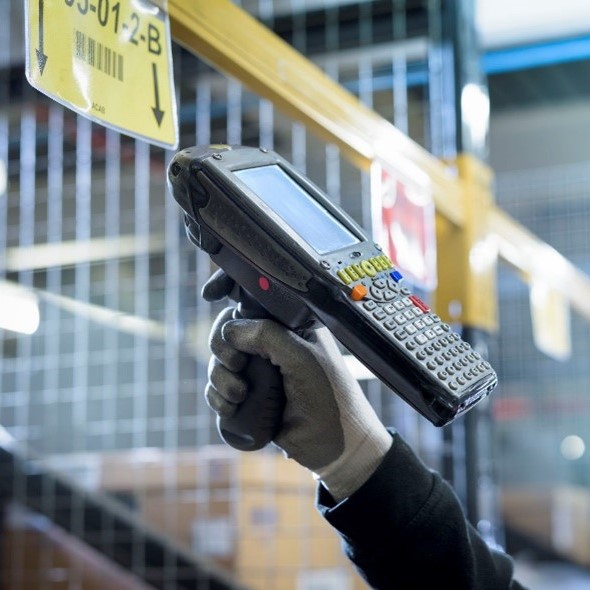
3. Barcode support. This minimizes data entry time and data entry errors as it allows users to capture information using ‘point-and-shoot’ barcode scanners. Factory Track supports GS1 Standard.

4. Touch-optimized user interface. Using large buttons and simplified menus on the touch screen, users can perform functions even when they are wearing gloves.

Figure 02: Forklift-mounted scanner

Figure 03: Handheld barcode scanner

Figure 04: Infor Factory Track user interface

5. Highly configurable. Infor Factory track is developed using the Infor Mongoose development platform, eliminating the need for complex coding to perform customizations.

6. Leverages the M3 API layer. This ensures consistency and performance.

7. Access via computers. If needed, the same application can be run on computers in addition to specialized hardware. This allows users to perform tasks such as system administration.

8. Platform Independent. Factory Track runs on any HTML5-supported browser.

9. Easy deployment and use. Factory Track is easy to deploy, and users can be trained in no time. This delivers significant ROI, quickly.

10. Cloud and on-premise availability. Businesses have the freedom to implement Factory Track on the cloud or as an on-premise solution.

11. Integrates warehouse and shop floor operations. Factory Track unifies warehouse and shop floor operations by bringing them under one solution.
FAQ

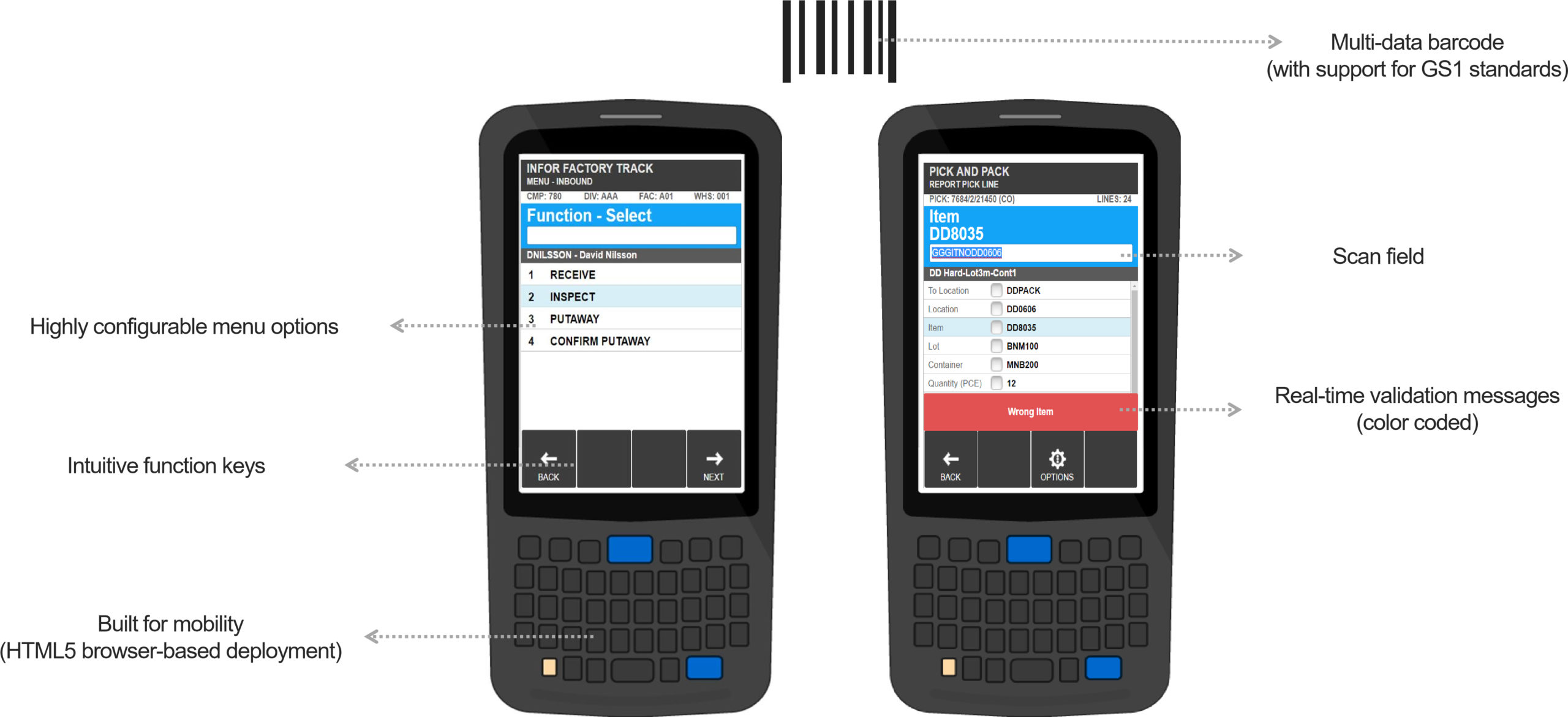
Infor Factory Track Interface and Key Features

Figure 05: Infor Factory Track interface and key features

FAQ

Infor Factory Track Capabilities

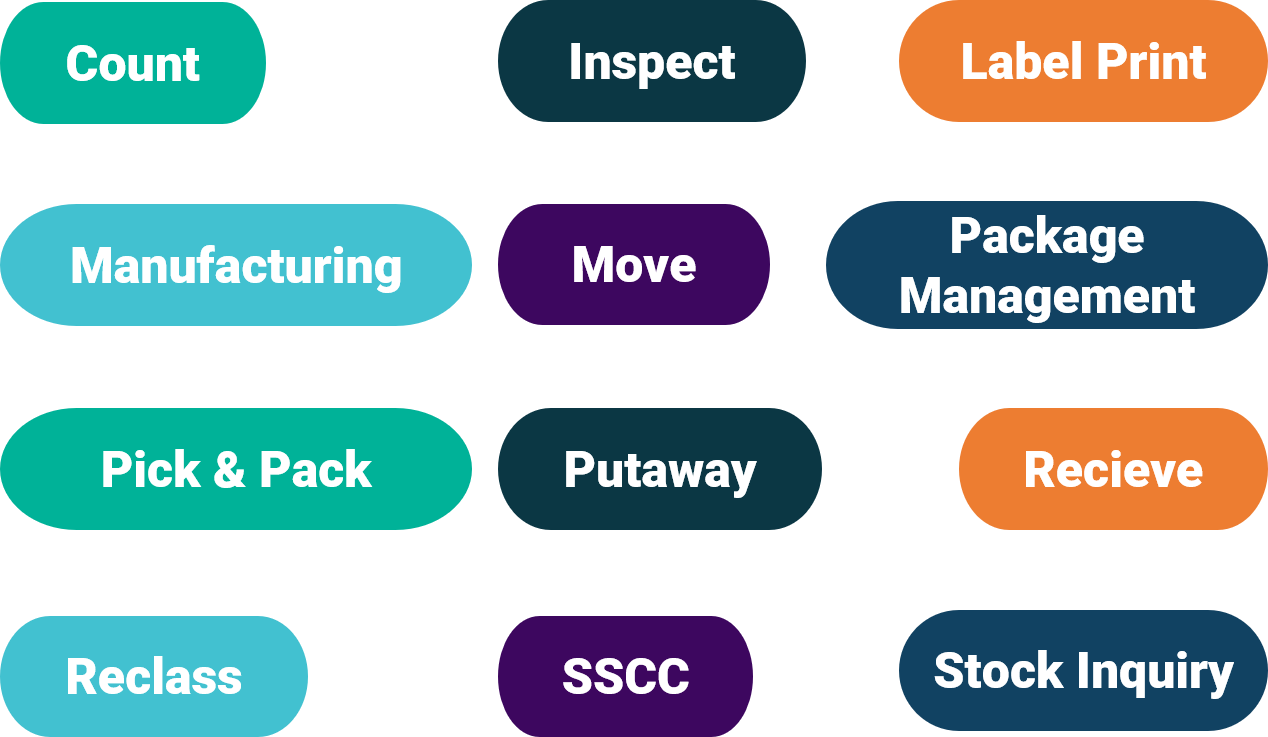
Figure 06: Infor Factory Track capabilities

FAQ

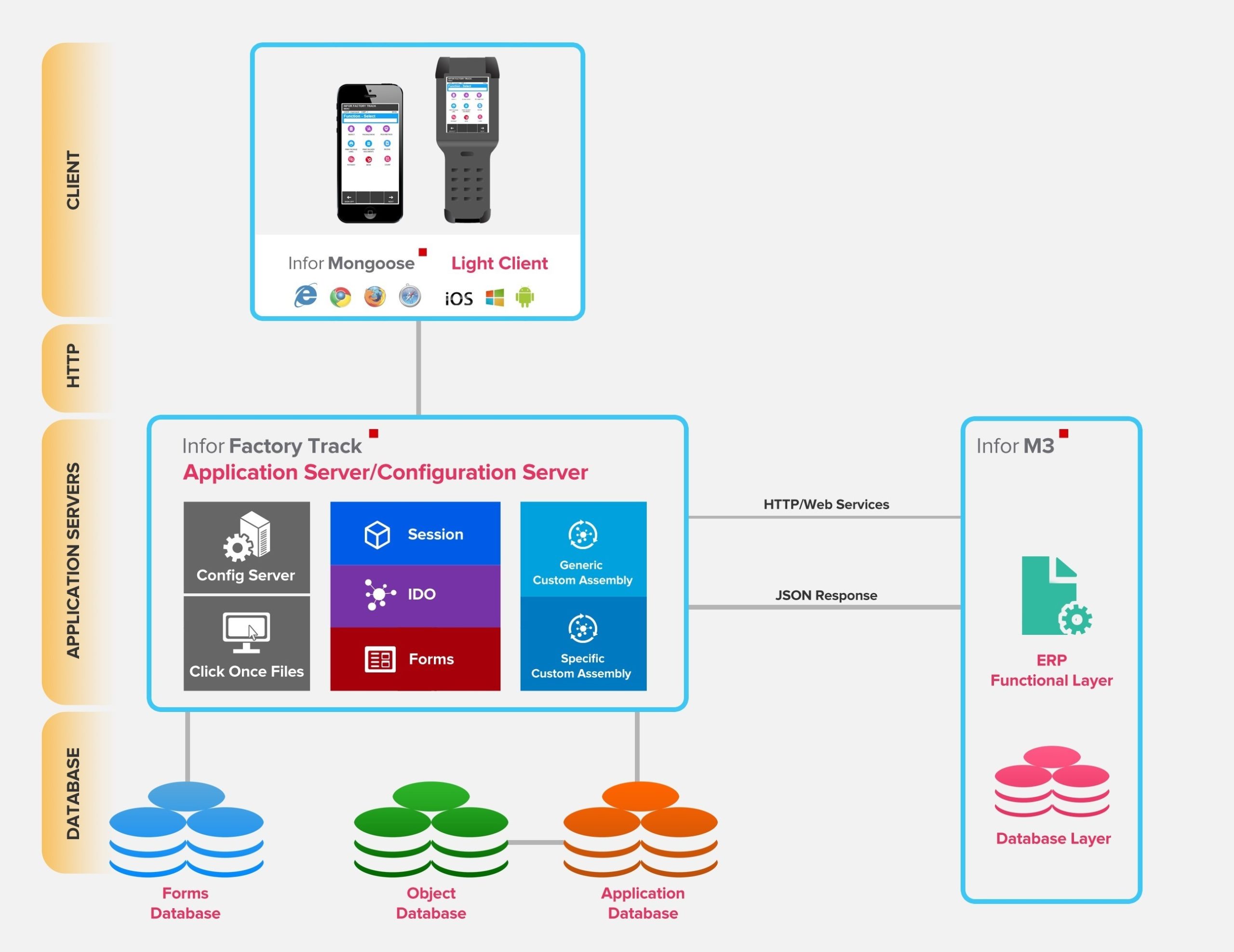
Infor Factory Track Architecture

Infor Factory Track is a web-based client that uses standard M3 APIs and Web Services to communicate with M3, which is a cloud-based, manufacturing, and distribution ERP system.

The light client supports iOS, Windows, or Android-based scanning devices.

Figure 07: Infor Factory Track architecture

FAQ

Conclusion

Infor Factory track is a powerful solution that unifies manufacturing and warehousing operations, boosting the efficiency and productivity of workflows. It adds value by providing manufacturing automation, warehouse mobility, traceability, and tools for tracking time and labor, on interfaces that can withstand fast-paced, volatile environments.

If you are looking for a solution that seamlessly facilitates warehousing and manufacturing operations and a solution that integrates with Infor M3/CloudSuite—Infor Factory Track is a great option.

FAQ

CONTENTS

Introduction
How do we overcome these business challenges?
Warehouse Management Systems
Shop Floor Management Systems
Enterprise Resource Planning (ERP) Systems
What is Infor Factory Track?
Why Infor Factory Track?
Infor Factory Track Interface and Key Features
Infor Factory Track Capabilities
Infor Factory Track Architecture
Conclusion

Receive the latest
Fortude Newsletter
updates.

Share

Receive the latest
Fortude Newsletter
updates.

Share