

From the threads: AI agents for workflows — What’s working and what’s not


As enterprises seek new ways to automate workflows, AI agents have emerged as one of the hottest topics in tech. But beyond the hype and headline use cases, what’s actually working in the field? And what are the friction points still slowing adoption?
Reddit threads such as r/productivity and r/LangChain are filled with first-hand experiences from early adopters, skeptics, and builders. According to Reddit users, AI agents for workflows are making progress, but there’s still plenty of room for growth. Here’s what we uncovered, and how Fortude’s agents built into Charlie – its AI knowledge assistant are already addressing some of these critical pain points.
The promise of AI agents: Delegation, not just automation
In theory, AI agents represent a step beyond rule-based automation. These agents are designed to act autonomously within defined parameters, reasoning through tasks, making decisions, and even collaborating with other agents or systems. On paper, they promise scalable workflow orchestration and time savings across knowledge work, operations, and support functions.
But as one Reddit user aptly put it:

This sentiment is echoed across dozens of threads, where users report AI agents that shine at narrow, well-defined tasks but struggle with multi-step processes, data context, and reliability.
The aspiration is clear: enterprises want intelligent assistants that go beyond static RPA scripts. But the road to agentic maturity is paved with cautionary tales. The stakes are especially high in mission-critical systems, where even small deviations can cause business disruptions.
What’s working: Narrow tasks, busywork, and retrieval
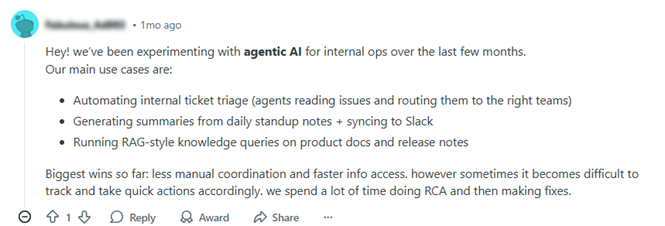
Despite the skepticism, many Reddit users shared use cases where AI agents are already providing value:
- Email and task triage: Agents that sort, tag, and prioritize tickets or emails, especially in internal support workflows.
- RAG-style knowledge lookups: Summarizing product documentation, answering common internal questions, and streamlining information retrieval.
- Daily summaries and updates: Generating Slack or email digests from meeting notes or project management tools.
- ERP data pre-fetching and autofill: Automatically populating forms or dashboards based on user queries.
One user noted:
Others highlighted:
- Document summarization to extract insights from lengthy SOPs or compliance guidelines.
- HR query bots that surface policies, time-off balances, and onboarding checklists on demand.
- Agent chaining to automate sequences like lead qualification, CRM update, meeting booking.
These narrow applications reduce time on repetitive tasks and support faster access to structured knowledge, with lower risk.
What’s not working yet: Accuracy, orchestration & observability
The Reddit community was just as vocal about what’s not working:
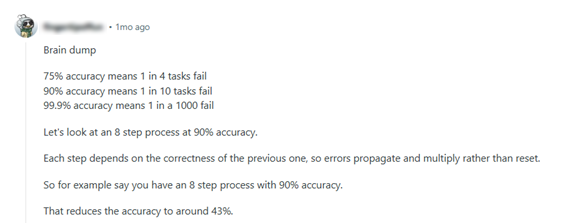
- Compounding failure rates: As one user shared, a 8-step workflow with 90% accuracy per step results in only 43% success overall. Error propagation remains a major concern.
- Context drift and hallucination: Agents still struggle to consistently retain context over long tasks or across systems.
- Lack of observability: Builders warn that without a monitoring layer, it’s impossible to understand why an agent behaved a certain way or where it went off track.
- Hard-to-scale integrations: Connecting agents to legacy systems, CRMs, or ERPs often requires custom APIs, tools, or middleware.
One user noted:
“The biggest challenge is maintenance: agents need clear rules, monitoring, and fallback protocols, otherwise small errors snowball fast.” -r/LangChain-
Another user mentions:
“Biggest challenges are context management, trust, and integrating with internal systems.” -r/LangChain-
These cautionary notes echo a common refrain: start small, validate often, and monitor everything.
Meet Charlie: Fortude’s answer to practical AI agent challenges
At Fortude, we’re not just following the AI agent conversation, we’re actively shaping it with Charlie, our enterprise-grade AI assistant. Built on a Retrieval-Augmented Generation (RAG) framework, Charlie is evolving from a knowledge assistant into an agentic AI platform with real-world impact.
Unlike general-purpose agents that try to do everything, Charlie is purpose-built for enterprise workflows. Each use case is designed around domain-specific pain points, with built-in safeguards, monitoring, and explainability baked into the design.
Let’s explore how Charlie is solving the pain points that Reddit builders are wrestling with.
1. Inventory levelling agent
Charlie’s inventory management agent uses real-time demand signals to assess stock levels and suggest redistribution between locations. This reduces stockouts and overstock scenarios without human intervention.
- Why it matters: It’s a tightly scoped, high-value task, exactly what Reddit users suggest agents should start with.
2. M3 release impact analysis
When a new Infor M3 release is published, a set of coordinated agents, including document parsers and source code analyzers, automatically identify impacted modules and generate Jira tickets for consultants.
- Why it matters: It removes 80–90% of manual analysis effort, while maintaining traceability and confidence through built-in validation layers.
3. Signal-based demand forecasting
This Charlie agent blends internal ERP data with external signals (e.g., weather, trends) to forecast SKU-level demand for fashion retailers. It recommends POs and shipment timelines in a single automated pass.
- Why it matters: Combines structured planning logic with adaptive context awareness, a step toward trustworthy decision-making.
4. MCP for ERP interoperability
Charlie integrates with Fortude’s Model Context Protocol (MCP), enabling secure and reusable access to Infor ERP systems. It acts as a translator layer, giving AI agents safe access to business data.
- Why it matters: This solves a massive pain point raised in Reddit threads: messy, inconsistent ERP integrations.
5. CharlieX: Democratizing enterprise intelligence
CharlieX, a companion to Charlie, focuses on enterprise analytics. It connects directly to ERP/CRM data and lets business users ask natural-language questions, surfacing patterns, anomalies, and recommendations in seconds.
- Why it matters: This bridges the gap between AI and decision-makers, allowing agents to proactively suggest actions instead of just returning results.
Best practices from the field: Lessons from Reddit and the enterprise
From hundreds of comments and real-world use cases, a few best practices emerge:
- Start narrow: Choose one pain point with clear ROI. Avoid broad, loosely scoped workflows.
- Build feedback loops: Use human-in-the-loop validation, even in production.
- Prioritize observability: Include logging, tracing, and evaluation from day one.
- Structure data access: Use protocols like MCP to define safe, scalable interfaces.
- Accept imperfection: Even a 70% reliable agent can drive ROI if paired with intelligent fallback mechanisms.
A realistic outlook: What’s next for AI agents in workflows?
The community sentiment is clear: AI agents are promising, but expectations need calibration. They’re not magic wands or full-time employees. But they can become trusted collaborators for narrow, repeatable workflows, especially when paired with structured validation, observability, and human oversight.
At Fortude, we believe the key is intentional design. Charlie isn’t trying to replace your workforce, it’s built to assist it with reliable, proactive, context-aware support.
As AI tooling matures and orchestration stacks become more robust, we expect agent adoption to move from niche experiments to mainstream deployments, with enterprises like ours leading the way.
Beyond the trend
Reddit threads reveal a grounded reality: AI agents for workflows are not yet plug-and-play, but the right design makes all the difference. Fortude’s Charlie and CharlieX are built with this in mind, blending retrieval intelligence, integration layers, and practical automation into agentic AI that gets work done.
FAQs
Regression testing is the practice of re-running previously executed tests to confirm that recent changes haven’t unintentionally broken existing functionality. Manual regression testing is a specific method of performing regression tests where testers execute each test case manually, step-by-step, without the aid of automation tools. This directly contrasts with automated regression testing.
Yes, manual regression tests can be appropriate in certain phases. For example, in early-stage projects, exploratory testing, UI changes, or volatile features where scripting overhead is too costly. But it should be tactical, manual regression is best suited as a complementary strategy, not as the long-term default for regression coverage.
It is important to prioritize those that offer the highest return on investment and long-term stability. Start with features that are relatively stable and not subject to frequent changes. This ensures your automation scripts remain reliable over time. You can also focus on high-frequency test cases such as login flows, search functionality, checkout processes, or APIs.
The ROI of automated regression testing becomes increasingly significant over time. Though initial setup has upfront cost, long-term ROI comes from faster release cycles, fewer escaped defects, reduced resource spend, and higher team leverage. It shifts quality assurance from a reactive process into a scalable, proactive practice that supports both speed and reliability in software delivery.
Absolutely, that’s the ideal path. Fortest doesn’t need to replace manual testing all at once. A hybrid model where manual regression testing is used for edge cases or emergent features while gradually shifting stable flows into Fortest’s automation environment can work best.
- The promise of AI agents: Delegation, not just automation
- What’s working: Narrow tasks, busywork, and retrieval
- What’s not working yet: Accuracy, orchestration & observability
- Meet Charlie: Fortude’s answer to practical AI agent challenges
- Best practices from the field: Lessons from Reddit and the enterprise
- A realistic outlook: What’s next for AI agents in workflows?
- Beyond the trend
- Want to see Charlie in action?
- FAQs
Related Blogs
Subscribe to our blog to know all the things we do